
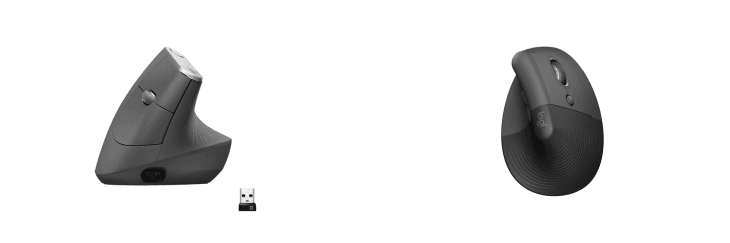
MX Vertical & Logitech Lift share many similarities, but there are also important differences, such as quality, performance, features, design, and connectivity. If you want the best one between them, I Would recommend the MX Vertical rather than the Logitech Lift.
Why Do I Recommend The MX Vertical?
- The Logitech MX Vertical offers a dedicated DPI switch for instant sensitivity adjustment, ensuring precise cursor control for tasks such as graphic design, photo editing, and data analysis, which the Logitech Lift lacks.
- The Logitech MX Vertical features a USB-C rechargeable battery that lasts up to 4 months on a single charge, providing convenience and eliminating the need for disposable batteries, unlike the Logitech Lift’s AA battery system.
- The Logitech MX Vertical supports wired connectivity via USB-C, offering a reliable, zero-latency connection for enhanced responsiveness during detailed work, while the Logitech Lift is limited to wireless use only.
- The Logitech MX Vertical has a larger, bulkier design, making it ideal for users with medium to large hands who require a more substantial grip for improved comfort and control, compared to the Logitech Lift’s compact build.
- The Logitech MX Vertical offers precision control mode, allowing users to switch to an ultra-precise tracking mode for tasks requiring exceptional accuracy, a feature unavailable on the Logitech Lift.
- The Logitech MX Vertical’s premium rubberized soft-touch coating enhances grip comfort during prolonged use, while the Logitech Lift’s textured finish provides slightly less tactile comfort.
- The Logitech MX Vertical has enhanced weight distribution (135g), adding stability for smoother mouse movement and reducing hand fatigue, while the lighter Logitech Lift (125g) may feel less substantial for users with larger hands.
- The Logitech MX Vertical’s higher price point reflects its premium features, advanced customization options, and versatile connectivity, providing greater value for professionals seeking ergonomic precision tools.
Maybe the Logitech Lift price can make you comfortable because it’s a little bit cheaper than the MX Vertical. But you have to compromise all the above-mentioned features. Now the Decision is Yours. I hope it was helpful to choose the right one.
.
Side By Side Comparison
| Feature | MX Vertical | Logitech Lift |
| Design | Larger, bulkier with a 57° angle | Smaller, compact with a 57° angle |
| Weight | 135g | 125g |
| Target Audience | Medium to large hands | Smaller to medium hands |
| Shape and Size | Bulkier ergonomic build | Slimmer and more portable |
| Material Finish | Rubberized soft-touch coating | Textured rubber grip |
| Battery Type | Rechargeable via USB-C | 1 AA battery (non-rechargeable) |
| Battery Life | Up to 4 months | Up to 2 years |
| Connection Options | Bluetooth, USB receiver, and wired via USB-C | Bluetooth and Logi Bolt USB receiver only |
| Button Layout | 4 customizable buttons + dedicated precision control switch | 4 customizable buttons |
| Scroll Wheel | Standard scroll wheel with precision control mode | Standard scroll wheel |
| Software Support | Full support with Logi Options+ | Supported by Logi Options+, but lacks some MX-specific features |
| DPI Sensitivity | Adjustable 400 to 4000 DPI with dedicated DPI switch | Adjustable 400 to 4000 DPI |
| Charging Port | USB-C fast charging | No charging port (replaceable battery only) |
| Color Options | Graphite | Graphite, Rose, and Off-White |
| Price | Check MX Vertical Price | Check Logitech Lift Price |
What Common Both Can Do?
- Ergonomic Design: Both mice feature a 57° vertical angle that encourages a natural handshake position, reducing wrist strain and minimizing muscle tension during prolonged use. This design promotes better posture and comfort.
- Customizable Buttons: Both models include 4 customizable buttons that can be programmed via Logi Options+ software, allowing users to assign personalized shortcuts, improving workflow and productivity.
- DPI Range: Each mouse offers an adjustable 400 to 4000 DPI range, providing precise cursor control for tasks such as detailed design work, gaming, or everyday browsing.
- Wireless Connectivity: Both the MX Vertical and Lift support Bluetooth and USB receiver connectivity, offering flexible wireless options to connect with multiple devices seamlessly.
- Multi-Device Support: Both mice can pair with up to 3 devices simultaneously and allow users to switch between them effortlessly using a dedicated toggle button, ideal for multitasking.
- Quiet Clicks: Both models feature silent click technology, reducing noise during operation, which is ideal for quiet environments such as offices, libraries, or shared workspaces.
- Eco-Friendly Design: Both the MX Vertical and Lift are constructed using certified post-consumer recycled plastic, contributing to Logitech’s sustainability efforts and reducing environmental impact.
Common Features
| Feature | MX Vertical | Logitech Lift |
| Ergonomic Design | Vertical ergonomic design with a 57° angle to reduce wrist strain | Vertical ergonomic design with a 57° angle to reduce wrist strain |
| Hand Positioning | Promotes a natural handshake position to reduce forearm muscle strain | Promotes a natural handshake position to reduce forearm muscle strain |
| Customizable Buttons | Features 4 customizable buttons for personalized shortcuts and enhanced productivity | Features 4 customizable buttons for personalized shortcuts and enhanced productivity |
| Scroll Wheel | Smooth scroll wheel for precision scrolling and seamless navigation | Smooth scroll wheel for precision scrolling and seamless navigation |
| DPI Range | Adjustable DPI range from 400 to 4000 DPI for enhanced precision and speed control | Adjustable DPI range from 400 to 4000 DPI for enhanced precision and speed control |
| Wireless Connectivity | Supports both Bluetooth and USB receiver for wireless connectivity | Supports both Bluetooth and USB receiver for wireless connectivity |
| Multi-Device Support | Supports seamless switching between up to 3 devices with a dedicated toggle button | Supports seamless switching between up to 3 devices with a dedicated toggle button |
| Software Support | Fully customizable via Logi Options+ software for button mapping, DPI control, and device switching | Fully customizable via Logi Options+ software for button mapping, DPI control, and device switching |
| Silent Clicks | Both models offer quiet clicks for noise-free operation | Both models offer quiet clicks for noise-free operation |
| Eco-Friendly Design | Constructed with certified post-consumer recycled plastic for reduced environmental impact | Constructed with certified post-consumer recycled plastic for reduced environmental impact |
| Price | Check MX Vertical Price | Check Logitech Lift Price |
FAQ
Which mouse is better for people with smaller hands? Does the MX Vertical have a dedicated DPI switch? Can both the MX Vertical and Logitech Lift connect to multiple devices? Are both the MX Vertical and Logitech Lift suitable for gaming? What is the battery life for the Logitech MX Vertical and Logitech Lift? Do both mice support wired connectivity? Is Logi Options+ software available for both models? Do both models feature quiet clicks for noise-free operation? Are both models designed with environmentally friendly materials? Which mouse is better for travel or portability? Can both models be used for left-handed users? Which mouse offers better precision for design or editing tasks? Do both mice support Mac and Windows devices? Are both models suitable for carpal tunnel or wrist pain relief? |