
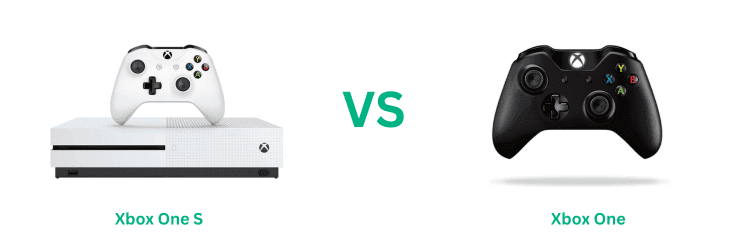
Xbox One S & Xbox One share many similarities, but there are also important differences, such as quality, performance, features, design, and connectivity. If you want the best one between them, I Would recommend the Xbox One S rather than the Xbox One.
Why Do I Recommend The Xbox One S?
- The Xbox One S features a significantly more powerful CPU (AMD Zen 2) for better performance to play modern games compared to the Xbox One’s AMD Jaguar CPU.
- It has a custom GCN GPU delivering 1.4 TFLOPS of graphical processing power & offering much more immersive visual experiences compared to the 1.3 TFLOPS of the Xbox One’s GPU.
- The Xbox One S supports 4K Ultra HD for media (Blu-ray and streaming), and HDR (High Dynamic Range) for both media and gaming. The Xbox One lacks 4K and HDR support
- It can play 4K UHD Blu-ray discs and stream 4K content from platforms like Netflix, while the original Xbox One is limited to 1080p for both gaming and media.
- The Xbox One S supports 802.11ac Wi-Fi, which offers faster and more reliable wireless connections compared to the 802.11n standard used by the Xbox One.
- Additionally, The Xbox One S includes an internal power supply, eliminating the bulky external power brick that was required for the Xbox One.
Maybe the Xbox One price can make you comfortable because it’s a little bit cheaper than the Xbox One S. But you have to compromise all the above-mentioned features. Now the Decision is Yours. I hope it was helpful to choose the right one.
.
Side By Side Comparison
| Feature | Xbox One S | Xbox One |
| Processor (SoC) | Improved 1.75 GHz AMD Jaguar | AMD Jaguar |
| Graphics Processing (GPU) | 914 MHz GPU clock speed | 853 MHz GPU clock speed |
| Graphics Output | Upscales to 4K UHD, native 1080p | 1080p, no 4K support |
| Blu-ray Drive | 4K UHD Blu-ray playback | Standard Blu-ray (1080p) |
| Release Date | August 2016 | November 2013 |
| Dimensions | 11.6 x 8.9 x 2.5 inches | 13.1 x 10.8 x 3.1 inches |
| Weight | 2.9 kg (6.4 lbs) | 3.5 kg (7.8 lbs) |
| Design | Streamlined, white matte finish, vertical stand option | Larger, bulkier, black finish, horizontal only |
| Media Streaming | Supports 4K streaming | Limited to 1080p streaming |
| HDR Support | Yes, supports HDR10 | No HDR support |
| Internal Storage Options | 500 GB, 1 TB, 2 TB | 500 GB, 1 TB |
| Power Supply | Integrated, internal power supply | External power brick |
| Max Resolution (Gaming) | Upscaled 4K for games, native 1080p | 1080p |
| Max Resolution (Media) | 4K UHD for media playback | 1080p for media playback |
| HDMI Ports | HDMI 2.0a (supports 4K and HDR) | HDMI 1.4a (1080p) |
| IR Blaster | Built-in IR Blaster for controlling other devices | No IR Blaster |
| Controller Compatibility | Bluetooth and proprietary Xbox wireless protocol | Xbox wireless protocol only |
| Wi-Fi Standard | 802.11ac (faster Wi-Fi) | 802.11n |
| Game Performance | Slightly improved frame rates and graphical fidelity | Standard frame rates, no graphical improvements |
| Power Efficiency | More power-efficient | Less efficient |
| Price | Check One S Price | Check One Price |
What Common Both Can Do?
- RAM (8 GB DDR3): Both consoles feature 8 GB of DDR3 RAM, ensuring smooth operation for multitasking, gaming, and streaming. This allows the Xbox One and Xbox One S to handle game performance similarly in most cases, even when running demanding titles.
- Storage Capacity Options: Both systems offer 500 GB and 1 TB models, providing ample storage for games, apps, and media. The Xbox One S introduces a 2 TB option, but for the common storage capacities, the options are identical. Both also support external hard drives, which can be connected via USB 3.0.
- Backward Compatibility: Both consoles are backward compatible with a large library of Xbox 360 games and select original Xbox titles, ensuring that players can access their older games without needing to keep multiple consoles connected.
- Game Library: Both the Xbox One S and Xbox One have access to the entire Xbox One game library, meaning there is no difference in the games you can play. Whether it’s new releases or classic titles, both systems run the same games.
- External Storage Support: Both consoles allow users to expand their storage with external hard drives via USB 3.0 ports. This is crucial for gamers who want to install a large number of games or media files, ensuring that storage expansion is simple on both systems.
- Controllers Compatibility: Both consoles are compatible with Xbox One controllers, so there’s no need to purchase new controllers if upgrading from one system to the other. This also includes specialty controllers like the Xbox Elite Controller.
- Xbox Live Multiplayer and Game DVR: Both consoles support Xbox Live for multiplayer gaming and have integrated features like Game DVR for recording and sharing gameplay moments. These online services are the same across both consoles, ensuring a consistent multiplayer experience.
- Streaming Services: Both the Xbox One S and Xbox One support popular streaming services like Netflix, YouTube, and Hulu. While the Xbox One S supports 4K streaming, both consoles can stream content from these platforms, making them capable home entertainment hubs.
- Ethernet and USB Connectivity: Both consoles have Gigabit Ethernet ports for stable, high-speed internet connections. They also feature three USB 3.0 ports, ensuring fast data transfer speeds and support for various accessories like external storage or charging stations.
- HDMI Pass-through and Optical Audio: Both consoles feature HDMI pass-through, allowing users to connect a cable box or other HDMI device through the console for ease of use. They also include optical audio output (SPDIF), making them compatible with high-quality audio systems.
- Online Subscriptions (Game Pass and Xbox Live Gold): Both consoles are compatible with Xbox Game Pass and Xbox Live Gold, giving players access to the same benefits, such as the ability to play online multiplayer, access free games, and get discounts on digital content.
- Voice Commands: Both systems allow the use of voice commands via the Kinect or a connected headset, allowing players to control the system without a controller. Although the Kinect is no longer a focus for Microsoft, the feature works identically on both systems.
- No Native Virtual Reality (VR) Support: Neither console supports native VR, meaning that they are not compatible with virtual reality headsets or VR gaming. This is a similarity that makes both systems less future-proof compared to newer systems that are beginning to explore VR support.
Common Features
| Feature | Xbox One S | Xbox One |
| Processor Architecture | Custom AMD Jaguar | Custom AMD Jaguar |
| RAM | 8 GB DDR3 | 8 GB DDR3 |
| Storage Capacity Options | 500 GB, 1 TB, 2 TB | 500 GB, 1 TB |
| Backward Compatibility | Supports Xbox 360 and select original Xbox games | Supports Xbox 360 and select original Xbox games |
| Game Library | Access to Xbox One games | Access to Xbox One games |
| External Storage | Supports USB 3.0 external hard drives | Supports USB 3.0 external hard drives |
| Controllers | Both consoles support Xbox One controllers | Both consoles support Xbox One controllers |
| Multiplayer Services | Xbox Live multiplayer support | Xbox Live multiplayer support |
| Game DVR | Supports recording and sharing gameplay | Supports recording and sharing gameplay |
| Streaming Services | Compatible with Netflix, YouTube, Hulu, etc. | Compatible with Netflix, YouTube, Hulu, etc. |
| Ethernet Connectivity | 1 Gigabit Ethernet port | 1 Gigabit Ethernet port |
| USB Ports | 3 x USB 3.0 | 3 x USB 3.0 |
| HDMI Pass-through | Supports HDMI pass-through | Supports HDMI pass-through |
| Optical Audio Port | Both have optical audio output (SPDIF) | Both have optical audio output (SPDIF) |
| Kinect Compatibility | Both can use Kinect (adapter required for S) | Built-in Kinect port (adapter for S) |
| Online Subscription | Xbox Game Pass and Xbox Live Gold compatible | Xbox Game Pass and Xbox Live Gold compatible |
| Voice Commands | Can use voice commands with Kinect | Can use voice commands with Kinect |
| Virtual Reality | No native VR support | No native VR support |
| Price | Check One S Price | Check One Price |
FAQ
| Q: Are the games for Xbox One S and Xbox One the same? A: Yes, both the Xbox One S and Xbox One use the same game library. There is no difference in the games you can play on either system, as they are part of the same Xbox One generation and share compatibility with all Xbox One titles. Q: Can I play Xbox 360 games on both the Xbox One S and Xbox One? Q: Do the Xbox One S and Xbox One have the same performance in gaming? Q: Is the Xbox One S smaller than the original Xbox One? Q: Can I use my original Xbox One controllers with the Xbox One S? Q: Do both consoles support 4K resolution? Q: Does the Xbox One S have better audio features than the original Xbox One? Q: Can both the Xbox One S and Xbox One use Kinect? Q: Are there any differences in online services between the Xbox One S and Xbox One? Q: Do both consoles support external hard drives? |